The same four-part Faymas prompt structure—Subject, Scene, Composition, Output rules—works across Midjourney, DALL-E 3, Stable Diffusion and Runway. What changes is how you express each part: Midjourney uses flags like --ar and --no, DALL-E 3 needs full sentences with no negative prompt field, Stable Diffusion has a separate negative-prompt box, and Runway wants positive language only. Adapt the syntax, keep the structure.
This guide maps our four-part prompt structure to four AI tools based on their published documentation. No cross-tool generation test was run. Parameter names reflect each tool's help pages at the time of writing and may change with updates.
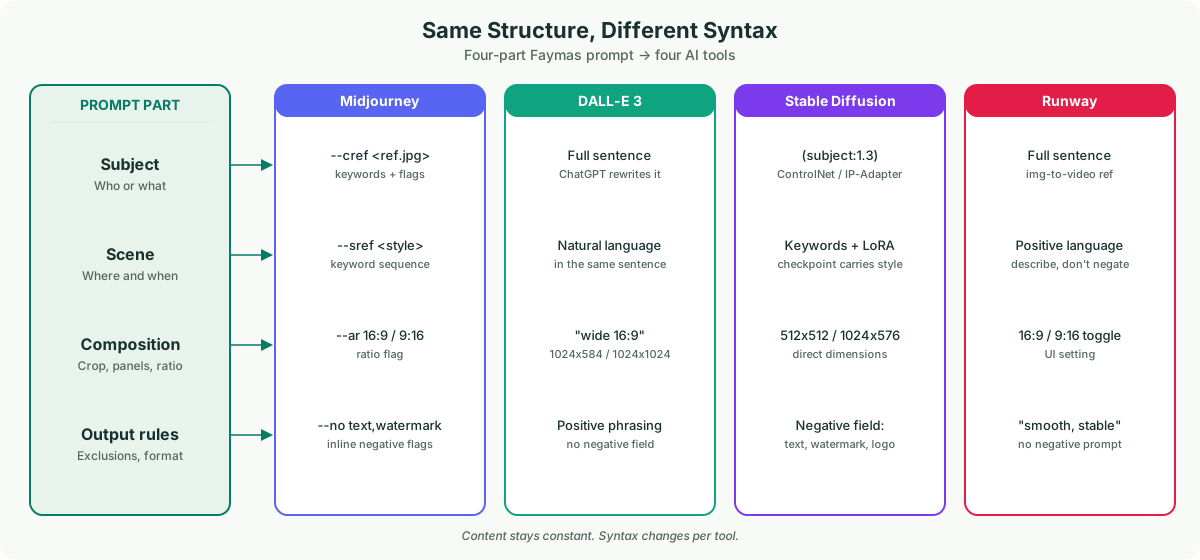
Why a Faymas prompt cannot be pasted verbatim into another tool
Faymas prompts are written for a specific generation context. When you move the same text to Midjourney, DALL-E 3, Stable Diffusion or Runway, three things break: parameter syntax (each tool has its own flags), negative-prompt handling (some tools have a dedicated field, others do not), and reference-image input (supported by some, rewritten by others). The content of the prompt—what the subject is, where the scene happens, how the image is composed, what to exclude—does not change. Only the expression does.
The adaptation table
Here is how each of the four prompt parts maps to the four tools. Read across a row to see how the same instruction is expressed differently.
| Prompt part | Midjourney | DALL-E 3 | Stable Diffusion | Runway |
|---|---|---|---|---|
| Subject Who or what | Keywords at the start of the prompt; use --cref for identity from a reference image | Full sentence naming the subject; ChatGPT rewrites your prompt internally, so be explicit | Keywords with optional weights like (subject:1.3); use ControlNet or IP-Adapter for reference | Full sentence describing the subject; upload the reference in image-to-video mode |
| Scene Where and when | Keywords after the subject; use --sref for style reference | Natural-language description of environment, lighting and mood in the same sentence | Keywords in the positive prompt; LoRA or model checkpoint carries style | Describe the scene in positive language; avoid negative phrasing |
| Composition Crop, panels, ratio | --ar 16:9, --ar 9:16, or --ar 1:1; state panel count in keywords | State ratio in words ("wide 16:9 horizontal"); DALL-E 3 accepts 1024x1024, 1024x584, or 1024x1792 | Set dimensions directly (512x512, 1024x576 for SDXL); state panel count in keywords | Select 16:9 or 9:16 in the tool interface; describe camera intent in words |
| Output rules Exclusions, format | --no text,watermark,logo (negative flags inline) | No negative-prompt field. Write exclusions positively: "clean background with no readable text" | Dedicated negative-prompt field: text, watermark, logo, signature. CFG scale 5–7 recommended | No negative prompt. Use positive language: "smooth, stable, clean frame" instead of "no shake" |
Worked example: adapting one Faymas prompt to four tools
Source Faymas prompt (car-side portrait): "Retain the person from the reference image. Leaning on a white hatchback. Vertical full-body, headroom above. No text, no watermark."
Midjourney version
--cref <reference.jpg> a person leaning on a white hatchback, vertical full-body, headroom above --ar 9:16 --no text,watermark,logo
Identity maps to --cref, composition maps to --ar, output rules map to --no. The scene stays as keywords.
DALL-E 3 version
A full-body vertical portrait of a person leaning on a white hatchback car, with headroom above the subject. The background is clean with no readable text, no watermarks, and no logos. Wide 9:16 vertical format.
Everything becomes a full sentence. Exclusions are stated positively within the description. DALL-E 3 does not accept reference images for identity—it will generate a new face.
Stable Diffusion version
Positive: (person:1.3) leaning on white hatchback, vertical full body, headroom above, 1024x576
Negative: text, watermark, logo, signature, font
Subject gets a weight boost. Exclusions go in the negative-prompt field. Dimensions set the ratio directly. Use ControlNet OpenPose or IP-Adapter for the reference identity.
Runway version (video)
A person leans on a white hatchback in a vertical full-body frame with headroom above. Smooth camera, stable shot, clean visual with no text overlays. 9:16 vertical.
Runway turns the prompt into motion. "Smooth camera, stable shot" replaces "no shake"—negative phrasing can cause the model to add the thing you want to avoid. Upload the reference in image-to-video mode.
Three traps when switching tools
Trap 1: Pasting --ar into DALL-E 3. DALL-E 3 does not recognise Midjourney flags. It will treat "--ar 16:9" as literal text and may render it in the image. Convert flags to natural-language instructions.
Trap 2: Using negative prompts in DALL-E 3. DALL-E 3 has no negative-prompt field. Writing "no watermark" in the prompt can sometimes cause the model to draw a watermark. Rephrase as "clean, unbranded background" and state what you want, not what you do not want.
Trap 3: Assuming reference images work everywhere. Midjourney --cref preserves identity. Stable Diffusion ControlNet maps structure. DALL-E 3 does not accept reference images at all—it rewrites your prompt and generates a new face. If identity preservation is critical, do not use DALL-E 3 for that task.
Questions before you switch tools
Can I use the same Faymas prompt on Midjourney and Stable Diffusion?
Not verbatim. The structure transfers, but the syntax differs. Midjourney uses flags (--ar, --no, --cref); Stable Diffusion uses a separate negative-prompt field and dimension settings. Convert the parameters, keep the content.
Why does DALL-E 3 change my prompt?
DALL-E 3 runs through ChatGPT, which rewrites your prompt before sending it to the image model. This means your exact wording is not preserved. To minimise rewriting, write a single clear paragraph and avoid fragment-style keyword lists.
Which tool is best for preserving a reference face?
Midjourney with --cref is designed for identity preservation. Stable Diffusion with IP-Adapter or ControlNet can also map a reference. DALL-E 3 does not accept reference images. Runway accepts references in image-to-video mode but does not guarantee identity preservation across frames. We have not tested success rates—this is based on documentation, not generation results.
For the pre-generation checklist that defines the four-part structure, read our prompt structure audit. For fixing errors after generation, see our error recovery guide. This guide is independent and is not affiliated with Faymas or any tool mentioned.